

How To Shop on My AGFT
At A Gift for Teaching, we make it easy to shop for the free supplies you need with three convenient shopping options:
- Free Teacher Supply Store
- Pencil Boy Curbside
- Pencil Boy Express — The Mobile Free Store
If you are eligible to shop and have not received our teacher shopping notices directly in your OCPS inbox, please check your spam and clutter folders. Click here to request our dedicated teacher shopping emails.

We understand that teachers get busy and are on the go. This is why A Gift For Teaching offers both an online and a free mobile app version of My AGFT – making it easier for you to schedule your monthly shopping appointments for free supplies from anywhere, at any time, on any device.
Log on with your OCPS email (first.last@ocps.net) and OCPS Employee ID number (12345)
The My AGFT+ mobile app is free and easy-to-use, offering all the functionality of the website, but with added features like in-app appointment check-in, paperless shopping, and faster check-out. Whether you’re at school, at home, or on the road, you can quickly and conveniently manage your monthly shopping appointments and never miss free supplies again!
How to Shop on My AGFT+ Mobile App
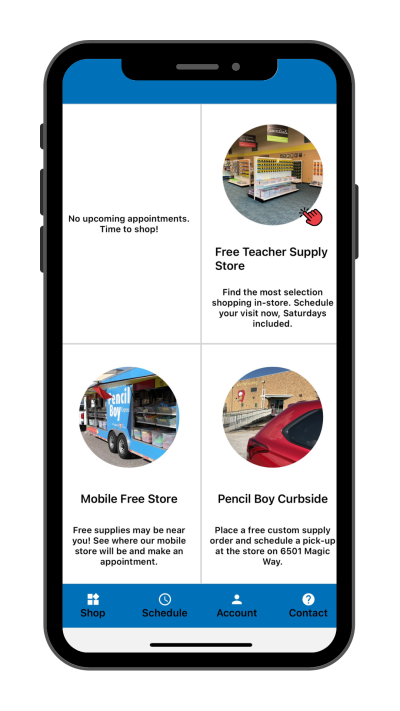
Step 1:
Tap “Free Teacher Supply Store” on the Shop tab.
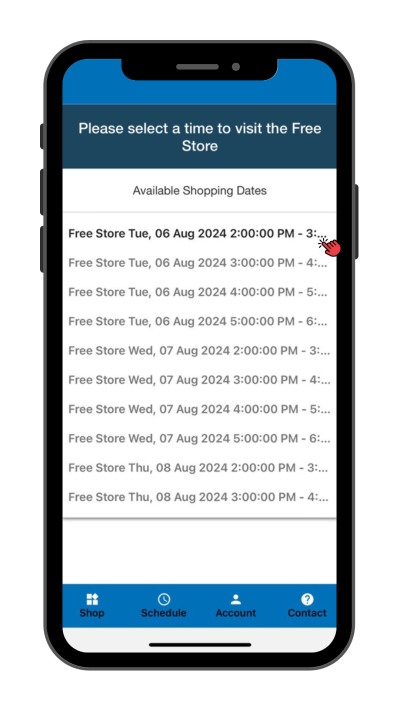
Step 2:
Select a date and time from the drop-down menu.
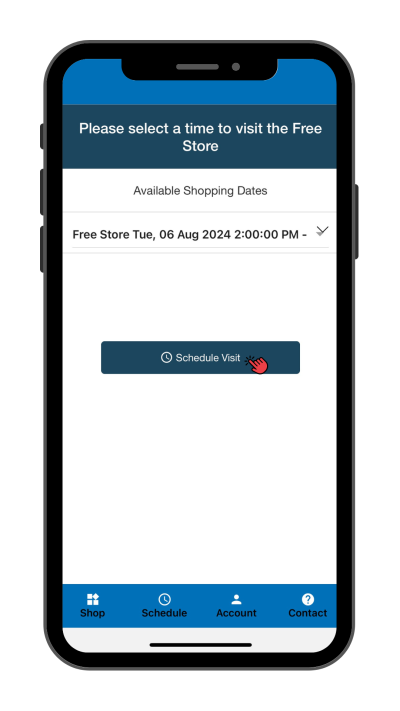
Step 3:
Tap “Schedule Visit” to confirm your appointment.
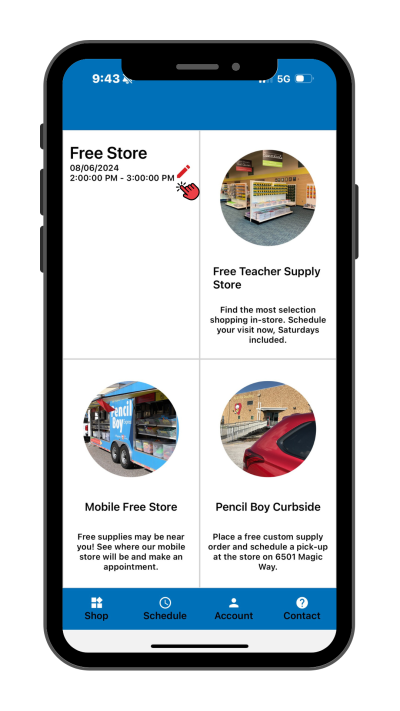
Step 4:
To change or cancel your appointment, tap the pencil icon.
ADDITIONAL DETAILS:
- Upon arrival, simply open the app and show the home screen with your appointment date/time to the check-in volunteer.
- Ditch the shopping clipboard and save the pencil for your students – the app makes us paperless! Scan the dedicated barcode sign for each item you put in your shopping bags, up to the listed maximum quantity, and the app will keep count of your free supplies as you shop for a quicker check-out.
- After shopping, simply tap “Check-out” in the app and show the screen to the check-out volunteer.
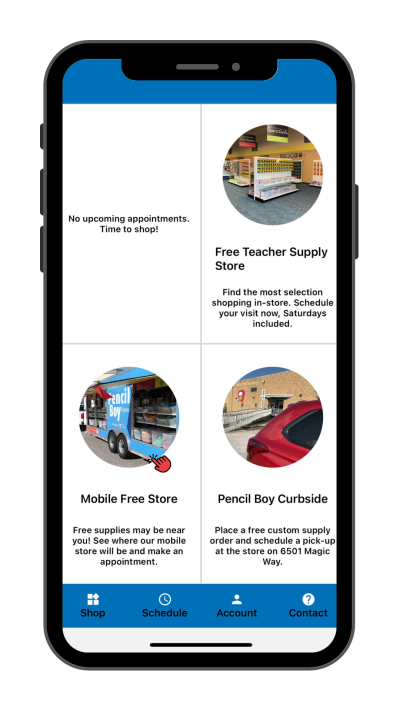
Step 1:
Tap “Mobile Free Store” on the Shop tab.
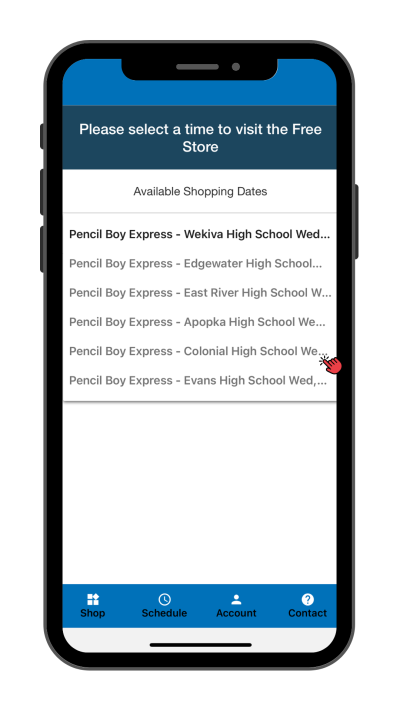
Step 2:
Select a date and time from the drop-down menu.
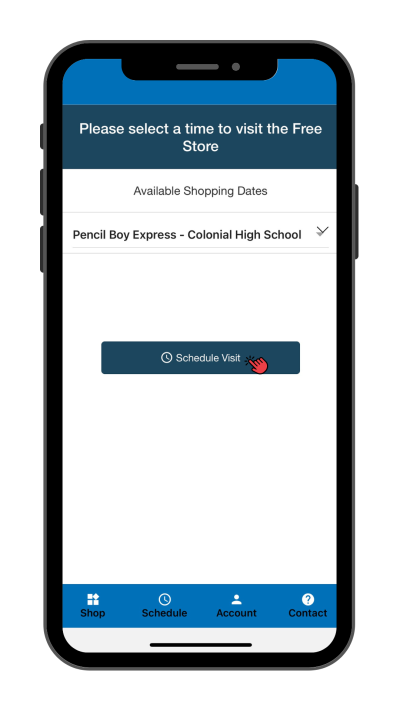
Step 3:
Tap “Schedule Visit” to confirm your appointment.
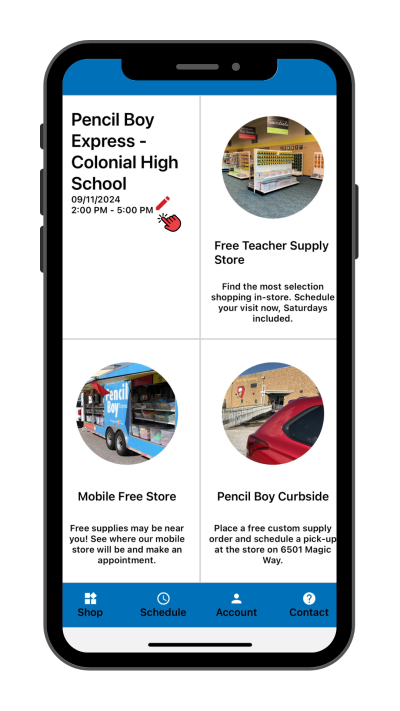
Step 4:
To change or cancel your appointment, tap the pencil icon.
ADDITIONAL DETAILS:
- Upon arrival, simply open the app and show the home screen with your appointment date/time to the check-in volunteer.
- Ditch the shopping clipboard and save the pencil for your students – the app makes us paperless! Scan the dedicated barcode sign for each item you put in your shopping bags, up to the listed maximum quantity, and the app will keep count of your free supplies as you shop for a quicker check-out.
- After shopping, simply tap “Check-out” in the app and show the screen to the check-out volunteer.
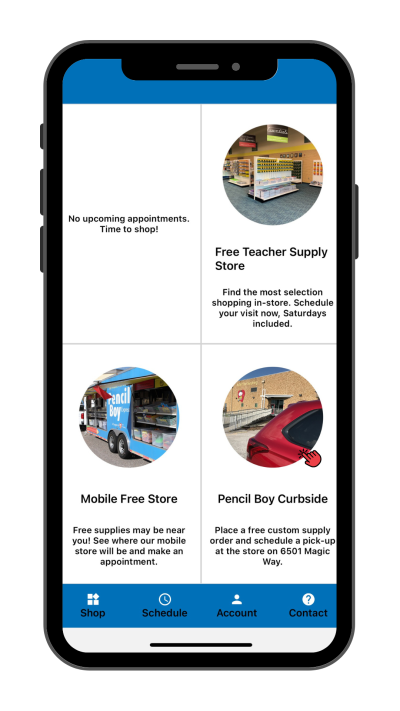
Step 1:
Tap “Pencil Boy Curbside” on the Shop tab.
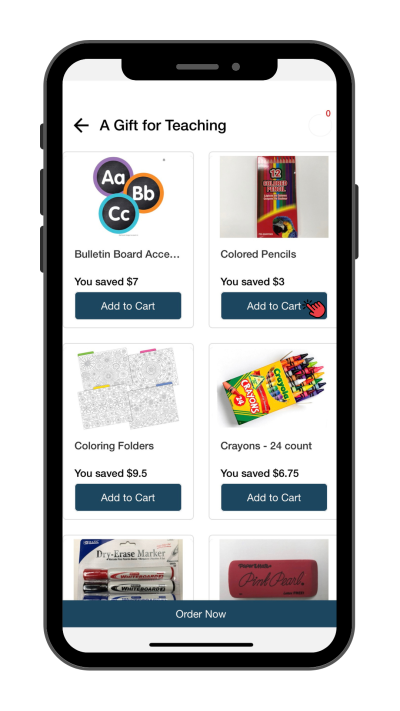
Step 2:
To select items for your order, tap “Add to Cart”
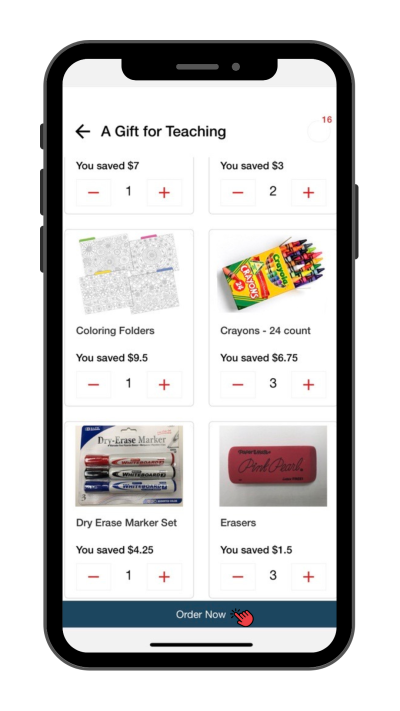
Step 3:
Tap “Order Now” when done.
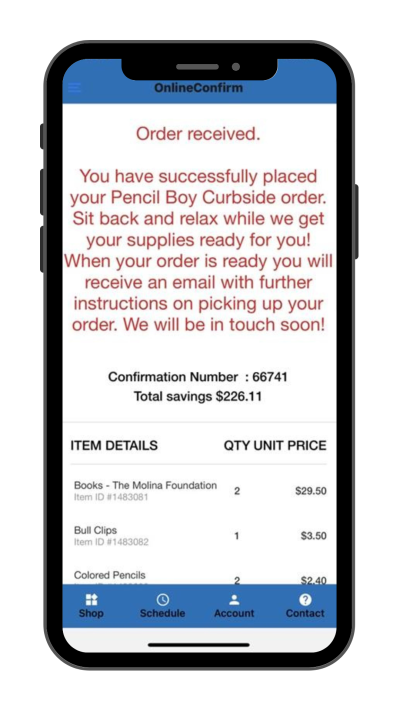
Step 4:
When ready for pick up, an email will be sent with further details.
ADDITIONAL DETAILS:
- Sharing is caring! Consider choosing “Select All” to order all available supplies and sharing any items you do not need with other employees at your school. Some schools may also have a space where extra supplies are kept and redistributed.
- When you submit your order and receive a confirmation email, this DOES NOT mean your order is ready. Pencil Boy Curbside orders are hand-packed with care by volunteers.
- Once your order is ready, you will receive an email that says: “Your curbside order is ready! Read to learn how to pick up your order.”
- Free Teacher Supply Store (Tuesdays, Wednesdays, Thursdays): From 2:00 pm to 6:00 pm, find a parking space with an orange barrel, and follow the instructions on the sign.
- Free Teacher Supply Store (Select Saturdays): From 8:30 am – 12:00 pm, find a parking space and visit the Check-in desk inside to pick up your order.
- If an order is not picked up in a timely manner, the order will be forfeited and continue to count as your shop for the month. Extensions are available upon request.
How to Shop on My AGFT Online
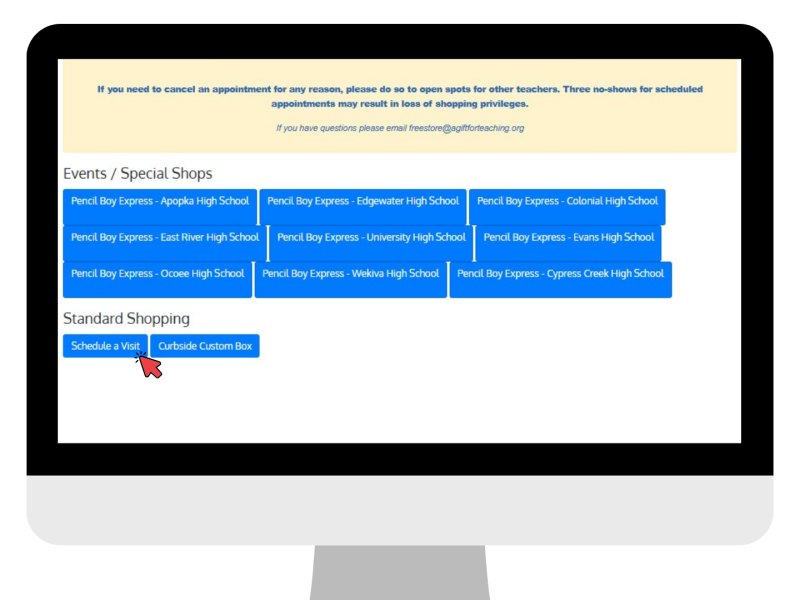
Step 1:
Click “Schedule a Visit” under Standard Shopping.
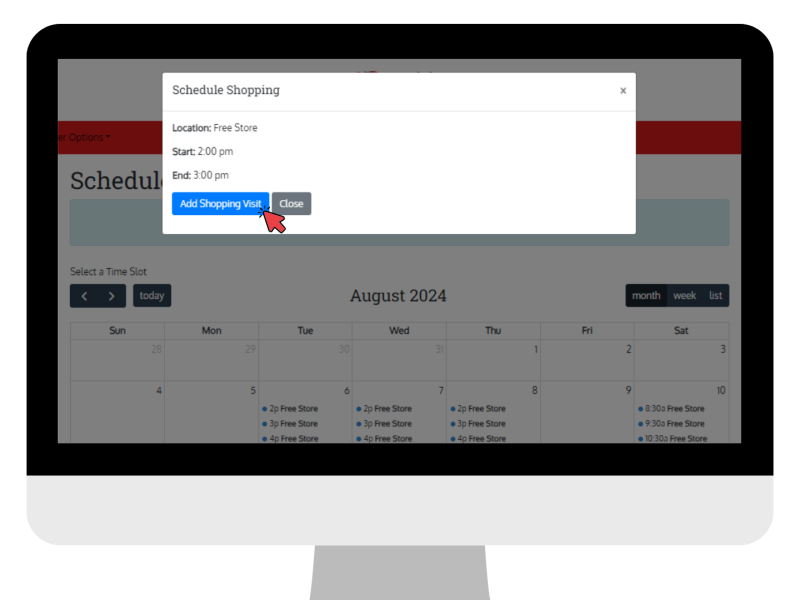
Step 2:
Select a date and time on the calendar, then click “Add Shopping Visit” to confirm your appointment.
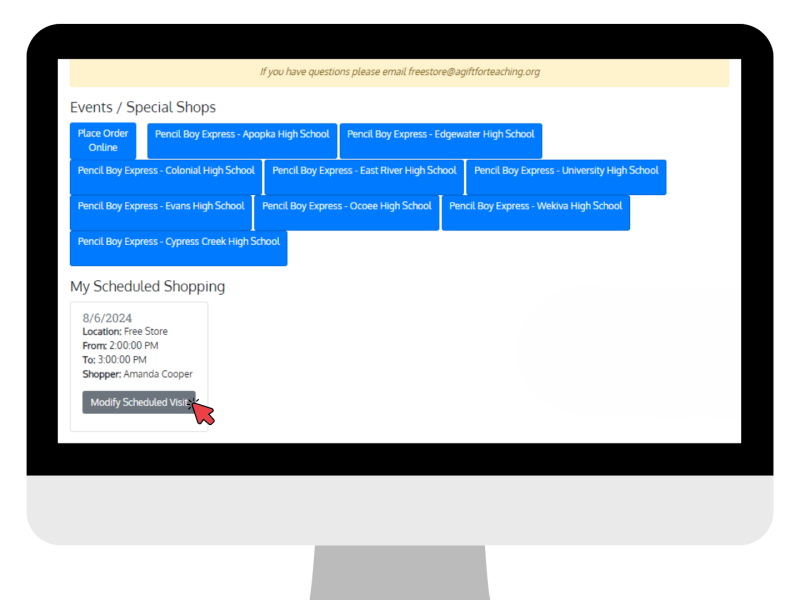
Step 3:
To change or cancel your appointment, click “Modify Scheduled Visit.”
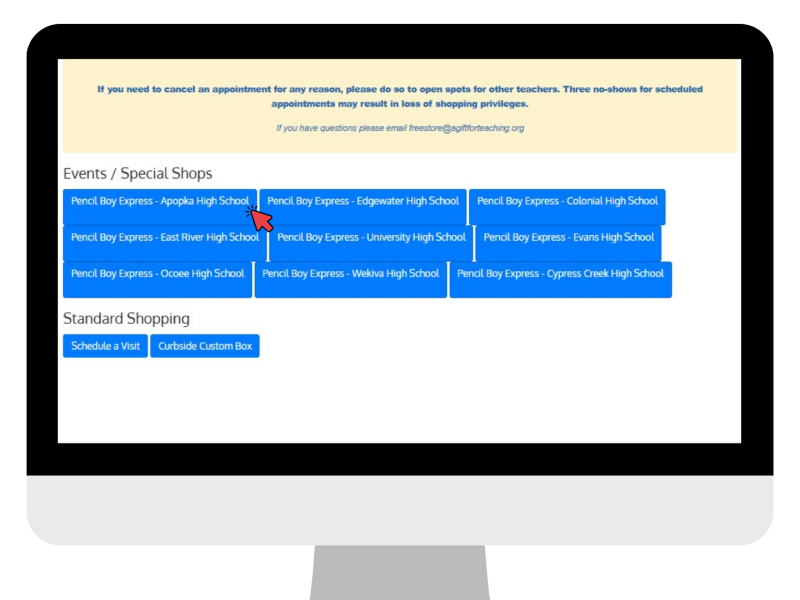
Step 1:
Click “Pencil Boy Express” at your preferred school under Events/Special Shops.
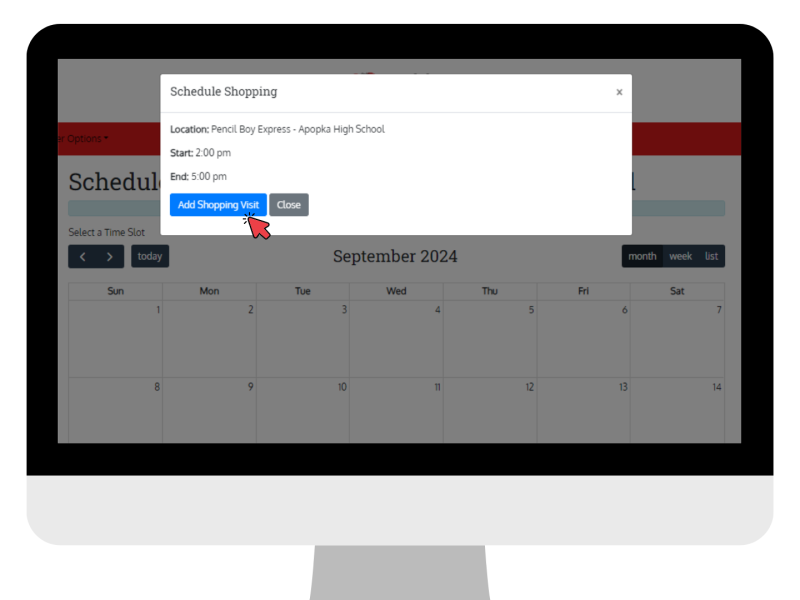
Step 2:
Select a date and time on the calendar, then click “Add Shopping Visit” to confirm your appointment.
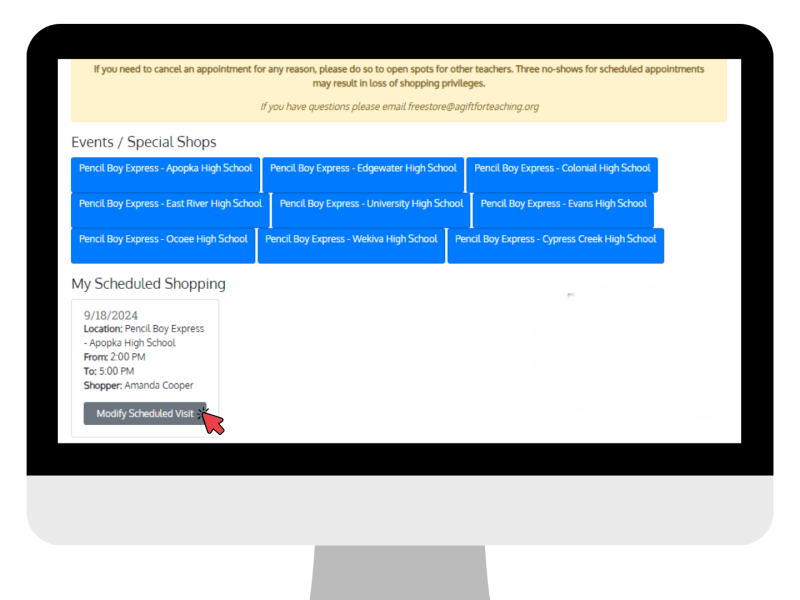
Step 3:
To change or cancel your appointment, click “Modify Scheduled Visit.”
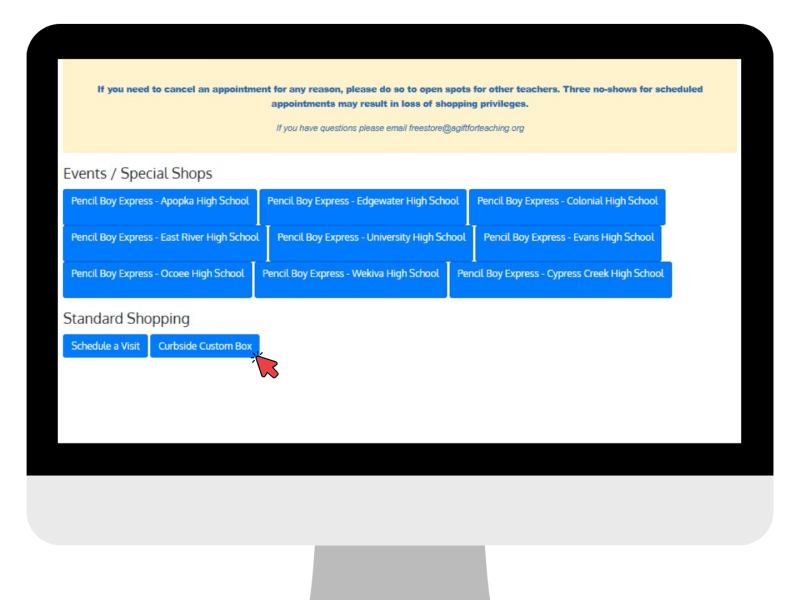
Step 1:
Click “Curbside Custom Box/Pencil Boy Curbside” under Standard Shopping.
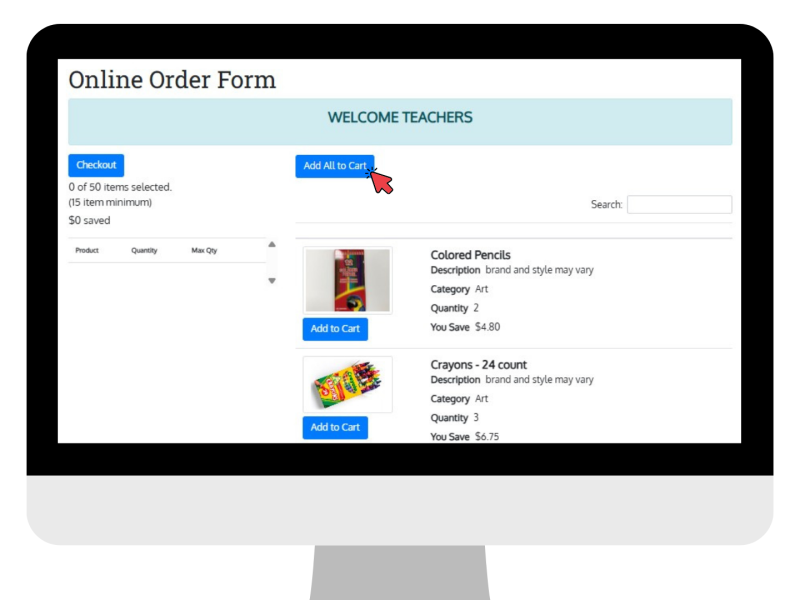
Step 2:
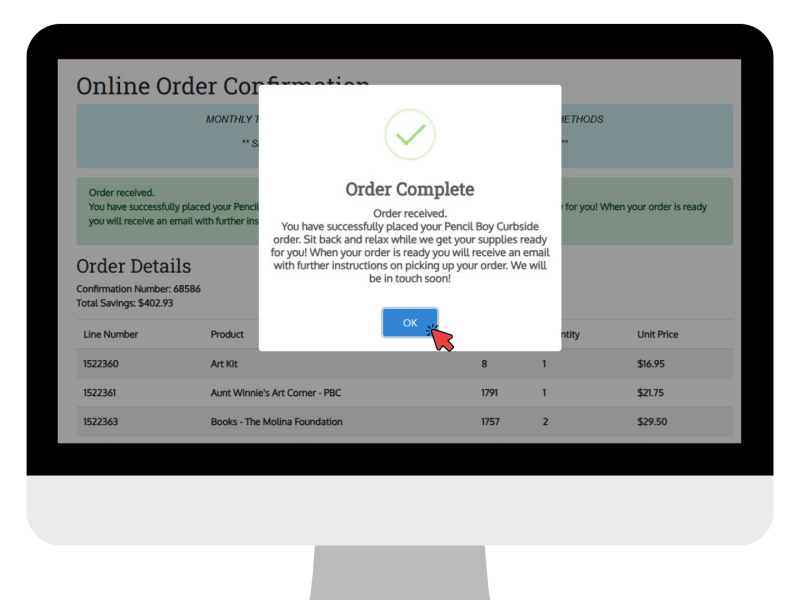
Click “Add All to Cart” or add individual items for your order, then click “Checkout.”
Step 3:
When ready for pick up, an email will be sent with further details.
ADDITIONAL DETAILS:
- Sharing is caring! Consider choosing “Add All to Cart” to order all available supplies and sharing any items you do not need with other employees at your school. Some schools may also have a space where extra supplies are kept and redistributed.
- When you submit your order and receive a confirmation email, this DOES NOT mean your order is ready. Pencil Boy Curbside orders are hand-packed with care by volunteers.
- Once your order is ready, you will receive an email that says: “Your curbside order is ready! Read to learn how to pick up your order.”
- Free Teacher Supply Store (Tuesdays, Wednesdays, Thursdays): From 2:00 pm to 6:00 pm, find a parking space with an orange barrel, and follow the instructions on the sign.
- Free Teacher Supply Store (Select Saturdays): From 8:30 am – 12:00 pm, find a parking space and visit the Check-in desk inside to pick up your order.
- If an order is not picked up in a timely manner, the order will be forfeited and continue to count as your shop for the month. Extensions are available upon request.
For additional assistance, please contact us at freestore@agiftforteaching.org or 407-318-3123.
Please note: If you are unable to keep your shopping appointment, please cancel as soon as possible so other teachers may have the opportunity to shop. Teachers who do not check-in for three (3) scheduled shopping appointments or do not cancel ahead of time may lose shopping privileges.


